

This blog post is part of a “Working with OAuth 2.0 APIs in Azure Data Factory” series, and you can find a list of the other posts here.
After all the work we’ve had to do so far, extracting the actual data seems like the easy part. Back to our API documentation for the Xero API, it looks like we need the following in each request for data:
- An authorization header with the word Bearer and the access token.
- Another header with our Xero tenant ID.
With this information we can now assemble it all in an Azure Data Factory pipeline, getting the necessary tokens from Azure KeyVault first and then using it to building the API request. Postman will again be helpful in this part, as we can use it to see the exact format of the headers and URL.
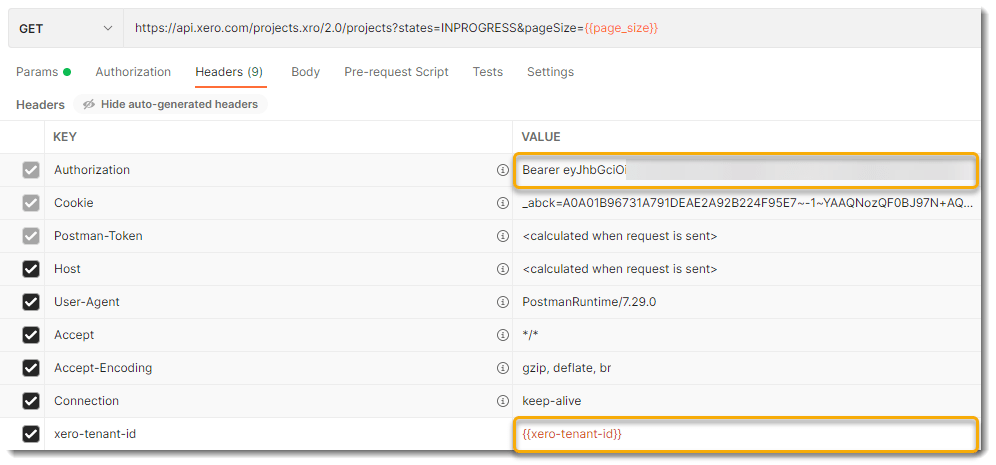
I’m using a variable in Postman to store and pass the tenant ID (image above) denoted by the {{…}}, and you can see the formatting of the authorization header for reference. The resulting Azure Data Factory pipeline will look something like this, where the tokens are retrieved as first step and then passed as additional headers:

Wrap it up!
My goal with this blog series was to make it a bit easier to understand and work with OAuth 2.0 APIs, and I hope this information provides a good basis to help you build your own integration pipelines. Before we wrap it up, here are a few last things I’d like to point out:
- Don’t start in Azure Data Factory. Tools like Postman will help you understand the API nuances better, and will save you a bunch of time.
- Column Mapping: In most cases, the nested JSON returned by your API request won’t map dynamically to a relational database target (or sink as it’s called in ADF). Create explicit column mappings that navigate the JSON structure, or parameterize the column mapping to maximize pipeline reuse.
- API limits: Be aware of the amount of data you need to extract, as well as the limits of the API. In many cases you may need to break the API requests into smaller batches, or implement some kind of pagination logic. The built-in pagination rules in the ADF copy activity won’t help you much here, and you’re better off creating your own custom logic.
It’s a wrap!