

This blog post is part of the Building a framework for orchestration in Azure Data Factory series.
The metadata that drives the execution within a framework is probably the most critical part. Going back to our analogy of building a house, the metadata would be the foundation. It is here where you are going to make some architectural decisions outside of which the framework cannot operate.
One such decision is how configurable or flexible you’d like the framework to be. In other words, how many attributes would you like to be dynamic and/or have the option to change during execution. It seems like an easy choice, and most engineers would lean towards “everything” or “as much as possible” as an answer. In reality however, the trade-off is complexity and the more dynamic you make the framework the more complicated it becomes. And you pay for the complexity later when you need to maintain or add new functionality to it.
I made that mistake at first, and quickly realized that the metadata monster I was building would not be sustainable in the long run. The answers to the following questions helped me settle on the final design:
- How generic do I want the pipelines to be, and which properties have to be dynamic in order to make that happen? These two elements go hand-in-hand, and the more generic you want things to be the more metadata attributes you will need. My advice is to start with absolute minimums here…for instance, the query to extract the data from a source table will have to be dynamic if you want to avoid a lot of duplication, but do you really need to make the Timeout property of an activity dynamic? The answer is probably “No”.
- How would I like to group and structure the “units of execution”, and do I need control over the order in which these units are executed? If you need elaborate options here, it will have to be represented in the metadata structure somehow.
<side note> Have you ever wondered why ETL framework and/or automation tools have not been more widely adopted as a standard? I have and I’ll wager an opinion…it’s because these tools force you to buy into their methodology, and in my opinion most ETL processes hardly fit the cookie-cutter profile. Is there a lot of repetition? Yes, but there’s also enough variation to make it extremely difficult for those tools to be a perfect solution. </side note>
I can probably ramble on about metadata considerations for a few more paragraphs, but I think it’s better explained by showing what I ended up with and the reasons for it. The image below shows the metadata structure I settled on, and I’ll explain the individual pieces in a bit more detail.

I ultimately decided on two hierarchical levels of granularity (processes & tasks) and feel that it gives me enough flexibility to control the order of execution, provide a mechanism for parallel execution and doesn’t add too much complexity.
Table: Process
A process in the context of this framework will be something like copying data from a specific source system to the staging area, or executing a series of stored procedures to load dimension tables. It forms the rigid boundary we discussed in an earlier post, and one I am happy to live with during the execution of my ETL process.
The explicit boundary means that I will need some other way of handling the execution of an entire ETL process from start to finish. It’s a deliberate choice that will become clearer towards the end of the series. Apologies for the suspense but the context is necessary. #SorryNotSorry
Here are some of the metadata attributes I store in the Process table:
- Environment (e.g. “QA”; “Production”)
- The benefit of having this attribute is that I can use one set of metadata tables for multiple environments. It’s more of a preference than a requirement, but it gives me some flexibility.
- Process Name (e.g. “Staging_Xero”; “Dimensions”)
- Descriptive name for the process. A consistent naming convention will help here, and I like to follow through with the naming convention for the tasks that belong to a specific process.
- Execution Sequence (e.g. “1”; “2”)
- The order in which the process will be executed. One could argue that it is unnecessary unless there is a mechanism to execute all processes at the same time, but I still like to have it as a means to document dependencies.
- Execute Process (e.g. “True”; “False”)
- The existence of this Boolean attribute gives me the ability to disable the execution of a process temporarily without the need to delete the metadata. It is especially useful during testing.
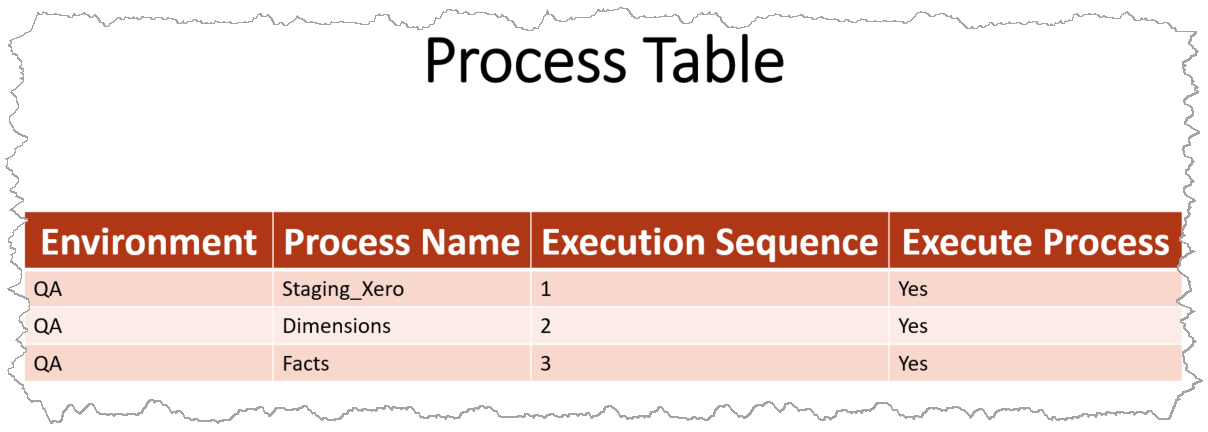
Table: Task
A task is the most granular unit of execution, and given the description of what a process might be a task will be the copying of an individual table from a source system, or the execution of a single stored procedure to load a dimension/fact table. The attributes I like to store in the Task table are the following:
- Process
- A reference to the process this task is associated with. It is usually a foreign key reference to whatever you decide to use as primary key in the Process table. I prefer to use surrogate keys.
- Task Name (e.g. “Staging_Xero_Invoices”; “Dimensions_Customer”)
- This is where I like to follow through with the naming convention I’ve chosen before, in this case <Process>_<Task>. Choose any convention and stick to it…your future self will thank you for it!
- Target Schema (e.g. “Staging_Xero”)
- My goal is to reuse components, and in order to achieve that I need to be able to dynamically change the target schema (and table) at runtime. For a staging task these values will be used as parameters in the Copy activity, and although not necessary for an activity that executes a stored procedure (which will become evident when we look at task queries), I prefer to populate these for the sake of documentation.
- Target Table (e.g. “Invoices”)
- This works in conjunction with the Target Schema, and although we could possibly combine these into one field it is my preference to keep it separate…for the sake of flexibility down the road.
- Column Mapping
- This field will contain the column mapping definition (json) we’ll need for staging tasks. I blogged about dynamic column mapping in more detail here.
- Data Factory Pipeline (e.g. “Copy Data – Xero”)
- The name of the pipeline we’ll execute to initiate this task. The Data Factory API will ultimately be used to execute this pipeline.
- Execution Sequence
- Similar to the execution sequence of the process, and will be used in conjunction with that sequence (of the owning process) to determine the overall order in which tasks will be executed.
- Execute Task
- Boolean field that gives me the ability to prevent the execution of a task temporarily, should I need to do that.
Table: Task Query
At this point you may be asking why I have a separate table for queries, if a task is the most granular unit of execution. I deal with some customers that have multiple instances of the same ERP system. These are at best separate (identical) databases on the same server, and at worst distributed across different physical servers. Extracting data from these are usually cumbersome, because you either have to duplicate a lot of code if you have separate staging tables, or build some mechanism to combine the data before transforming and loading it.
The separate metadata table accounts for this scenario, with multiple source queries that can populate the same staging table. It may not be as useful for you, but it is extremely useful to me for those reasons. Here are the attributes of this table:
- Task
- A foreign key reference to the Task table.
- Connection Secret
- I usually store connection strings in Azure Key Vault secrets, and this is the name of the secret to use when connecting to the source system. Storing and using connection strings like this make the linked services in ADF truly dynamic, and protects the sensitive information it may contain.
- Source Query
- This field will store the source query of a staging task, or the name of a stored procedure to execute for transformation tasks.
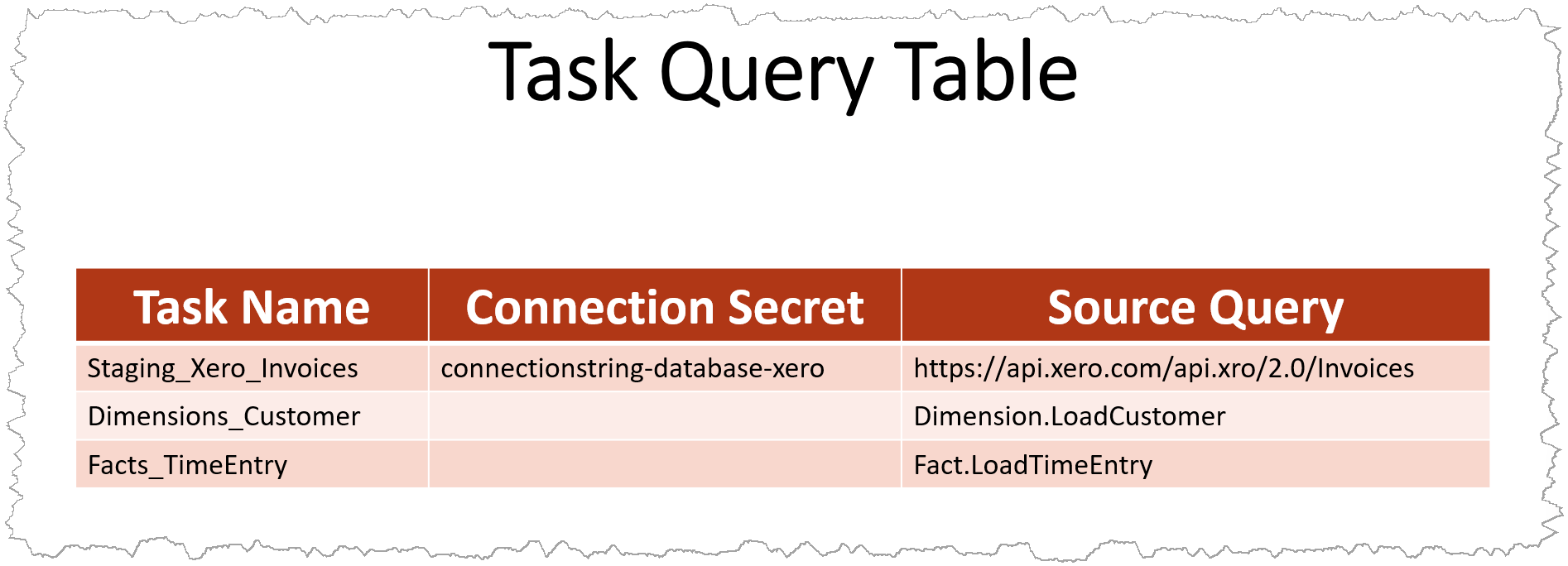
Table: Parameter
The Parameter table is nothing more than a store for key/value pairs, for any global parameters you may need. My primary use for it is to store the number of days or months I’d like to go back when extracting source data (a sliding window approach), which is then translated into a date value and injected into source queries where needed.
Yes, I prefer to use a sliding-window approach and develop my ETL processes in such a way that it doesn’t cause duplicate data. I’d much rather extract a little more data than having to hand-hold the process after a failure…and the sliding-window approach makes that possible.

As an example, the image above shows two parameter values…one that determines the size of the sliding window for a daily load, and one for an hourly (or more frequent) load. For daily loads I may want to go back 20 days, whereas for an hourly load I may only want to load the last day’s worth of data.
Task queries may look something like this when it contains a placeholder for a dynamic value, and the stored procedure that extracts the metadata will inject the necessary date value before it is passed into the Copy Activity:
With placeholder: select field1, field2, ... from Invoices where InvoiceDate >= '@[Xero_StartDate]'

After extraction/injection: select field1, field2, ... from Invoices where InvoiceDate >= '1/1/2024'
Stored Procedures
There are a few stored procedures to extract the necessary metadata for pipeline execution. The contents are relatively straight forward and the usage will be clear once we start talking about the actual pipelines of the framework. For that reason I will not discuss them in detail here, but they are available in my GitHub repo.
Want the source code for all the metadata tables? Have a look at my GitHub repo.