This blog post is part of the Building a framework for orchestration in Azure Data Factory series.

We’re finally ready to dive into the Data Factory components that form part of the framework, and we’re going to work our way from the bottom up. To paraphrase the previous blog post, worker pipelines perform the actual work of either moving data (from source to staging) or executing a stored procedure that will load a dimension/fact table.
Although worker pipelines can contain any number of tasks you may need, my worker pipelines that move data from a source system into the staging area follow a similar pattern with at least the following activities:
- A Lookup activity to extract the source queries and other metadata associated with the task, from the Task & TaskQuery metadata tables. A source query could be the text of a SQL statement, API endpoint if you’re sending API requests, or XML query if you’re extracting data from Dynamics CRM for example.
- A Script activity to truncate the staging table (target).
- A Copy activity to copy the data from the source table/entity into the staging table. The Copy activity is encapsulated by a For Each activity, to account for the fact that we may have multiple source queries.
There can of course be some variation to the above, and that will depend on the type of source system you’re dealing with. For example, a worker pipeline that uses an OAuth 2.0 API will most likely include a Web activity that gets the required access tokens (image below), something I like to store in Azure Key Vault and have blogged about here.

Parameters
In order to make the layers of the framework somewhat independent, we cannot pass all of the metadata down from the initiating pipeline…because the metadata we need may be different for the different types of data sources. The framework I built was designed to only pass the task identifier “down the line”.
This may seem counter-intuitive at first because we’re repeating the same thing (extracting metadata) in every worker pipeline, but in this instance I feel that it is a worthwhile tradeoff because it gives me the ability to add new (and maybe different) workers without touching the orchestration layer. Let’s call it the “plug-and-play effect”, and based on that design choice I have found that I only really need two parameters in this layer:
- Task Identifier: This value (surrogate key in my case) is passed down from the orchestration layer, and used as input to the Lookup activity that extracts the metadata.
- Key Vault Secrets URL: The inclusion of this parameter is based on preference more than necessity, and only for worker pipelines that need to fetch some property from the Key Vault, for instance access keys for an API request. The Web activity doesn’t allow you to reference a Linked Service, and so we have to store the URL somewhere, and using a parameter we only have to store it in one place at least. You could probably use a variable as well, but I like it as a parameter here because it is immediately visible and give us the option to override it in multiple ways if we ever need to.
In the image below you may notice that I populate the second parameter with a default value (blurred for the sake of the public image), and you may wonder why I don’t store that in the metadata layer. It’s an interesting conundrum…if you decide to store everything in the metadata tables, then where do you store the connection string to the metadata itself? At some point somewhere, you will need persist a value and choosing where that’s going to be is the million dollar question. For me personally, I’d rather store the URL to the Key Vault secrets like this where I can set the value during deployment, and know that not everyone will have eyes on the potentially sensitive data via the metadata tables.
There’s always an exception somewhere, and when building a framework the most difficult part is deciding what tradeoffs to make and where.

Datasets
An ADF Dataset is the vehicle for transferring data between a source and sink (target), or just between activities. Datasets are tied to a specific Linked Service and by definition then also a type of data source. The association between Dataset and Linked Service is not dynamic and you cannot change it at runtime, but apart from that we have a lot of room to maneuver.
The image below shows a Dataset that can be used to extract data from an Azure SQL database. Apart from the association with the Linked Service, all other properties are left empty…including the schema because we can define that at runtime by using dynamic mapping. It’s as “vanilla” as it can be, and the properties of the Copy activity will allow us to define a source query to execute against this Dataset.

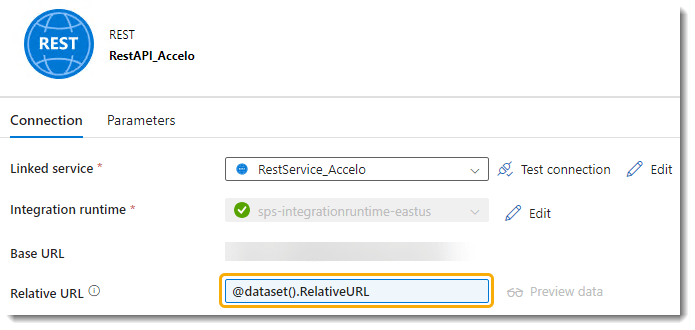
Data sources are not all the same, and certain types may require you to define or parameterize different attributes. For instance, a REST API dataset is structured a little different to the relational database ones, and you can parameterize the relative URL (or source query if you would) in the dataset itself (image below). It is important to work through the variations related to your specific data sources, and determine how best to define the properties so that you can plug it into a framework easily…if that is your goal of course.
In my experience thus far, you will need one Dataset for each source system (or type of source but I wouldn’t recommend that), and at least two for your target Data Warehouse…one with parameters for the schema & table, which you will use as sink (target) in your Copy activity, and one with no parameters or values apart from the association with the Linked Service, which you will use to execute queries or stored procedures. If you have a separate database for your metadata or separate your staging database from the dimensional one, you would need additional Datasets for those as well.
Copy activity
The Copy activity in each worker pipeline moves the data from source to target, and the sink (target) properties will typically look like the image below. The schema & table name extracted from the metadata is passed as parameters to the Dataset, and I have also updated the write batch size and timeout settings to be something other than the defaults.

If you’re wondering why these two attributes (write batch size and timeout) isn’t dynamic and metadata-driven, the answer is simply this: How many times have you needed such granular control that required you to set them at runtime, or for individual tables? If you’re like me, my guess it that you start with a number you’re comfortable with, and adjust it only if you have very specific issues. And when you do change it, you will typically do so for all tables coming from the same source.
If you disagree with that statement, then you’re part of the 20% and not the 80% that never touches those properties. And therein lies another piece of advice after many, many hours of tinkering: Use the 80/20 rule if you’re designing or building a framework. The framework should account for 80% of your use-cases with zero changes required, and you can deal with the other 20% as they come. If you want a higher percentage, get ready for some more complexity because it’s coming your way fast! Trust me on this one.
Another set of properties that fall within the same category and worth pointing out is the Maximum data integration unit and Degree of copy parallelism settings. Unless absolutely necessary, I don’t see why you wouldn’t start with the settings that would result in the least amount of charges for your pipeline execution.
For brevity I will not go into the details of the Source properties in the Copy activity, because it will differ depending on the type of source you’re dealing with. I do want to however highlight the Mapping properties as it is a critical piece of the puzzle. Because we’ve stored (and extracted) the JSON for the mapping as text, we have to convert it to JSON as shown in the image below.

Data Factory templates
As part of this blog series, I am publishing the templates of my framework in my public GitHub repo. It is free to use by anyone who wants to, either as a starting point for their own framework or as a complete solution to play around with.
I recommend that you attempt to deploy these in a test environment first, and please read the documentation before doing so. It contains important information you will need for a successful deployment.
The documentation can be found here: Readme – Workers
The ARM templates can be found here: Data Factory Templates
One thought on “Building a framework for orchestration in Azure Data Factory: Workers”